
Workflow
How LinkedReply Works
Comments, posts, connection messages, InMail, and outreach drafts all come from one system built around your voice, your knowledge, and the workflow inside LinkedIn.
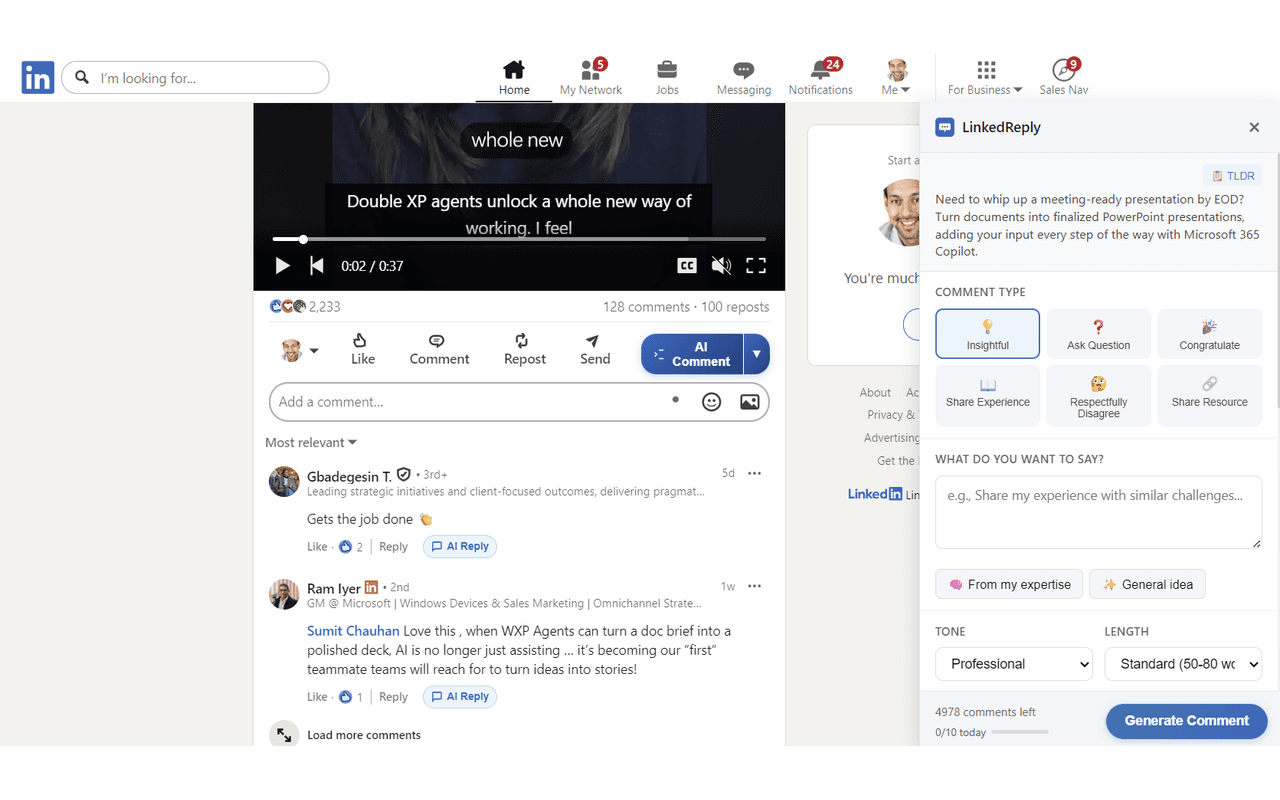
Generate comments where the post already lives
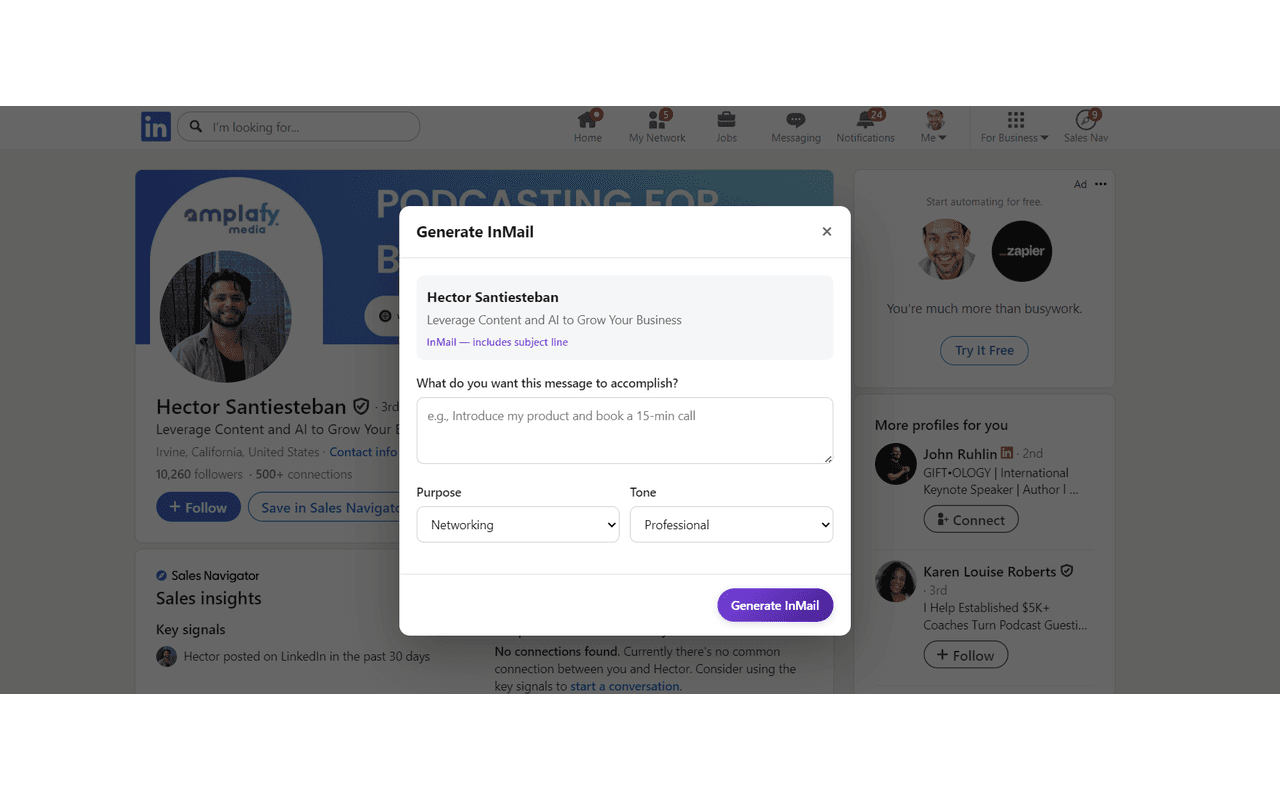
Move from public engagement into direct outreach
Train Your Voice with Write Like Me™
Upload examples of your LinkedIn posts and comments. Our AI analyzes your tone, vocabulary, and personality to build a unique voice profile that makes every piece of generated content sound authentically like you.
Build Your Knowledge Base with Think Like Me™
Upload documents, PDFs, and notes — or scan your blog posts automatically. Think Like Me™ indexes your domain expertise so the AI can reference your real knowledge in every comment, post, and message.
Install the Chrome Extension
Add LinkedReply to Chrome with one click. It integrates seamlessly with LinkedIn, adding buttons for comments, post drafting, connection messages, InMail, and meme generation directly in your feed.
Generate Knowledge-Backed Comments
Find an interesting post and click generate. Choose from 50+ comment types across multiple tones and lengths. Our AI draws on your expertise and voice profile to craft professional, insightful comments.
Draft LinkedIn Posts
Create original posts or get inspired by trending content. Post drafting includes anti-AI phrasing, Google Trends integration, and optional AI-generated images — all in your authentic voice.
Send Connection Messages & InMail
Generate personalized 300-character connection requests and full InMail drafts for sales, recruiting, or networking. Each message is tailored to the recipient’s profile.
Review with Anti-AI Detection
Every piece of content passes through our anti-AI detection system that removes robotic patterns and ensures natural phrasing. Review, tweak if needed, and post with confidence.
Coverage
The product now covers the full LinkedIn writing stack
Comments, posts, direct outreach, research, knowledge retrieval, and anti-AI cleanup all sit inside the same product system.
Write Like Me™
Voice matching from your writing samples. AI analyzes your tone, vocabulary, and style to generate content that sounds like you.
Think Like Me™
Upload docs, scan blog posts, and build a knowledge base. AI references YOUR expertise in every comment and post.
Smart Promotion
Set up your business profile and let AI naturally weave product mentions into relevant comments. Promote without being promotional.
50+ Comment Types
Multiple tones, lengths, and styles with automatic post-type detection. From insightful analysis to quick agreements.
Post Drafting
Create original LinkedIn posts or get inspired by others. Includes anti-AI phrasing, Google Trends integration, and AI image generation.
Connection Messages
Personalized 300-character connection requests tailored to each recipient’s profile and your relationship context.
InMail Drafting
Full personalized InMails for sales outreach, recruiting, and networking. Each message is crafted for the specific recipient.
Meme Generation
AI-generated memes powered by Gemini. Add humor and visual engagement to your LinkedIn presence.
Daily Goals
Set and track your daily engagement targets. Stay consistent with your LinkedIn growth strategy.
Research-Backed
Perplexity AI provides real-time research to enrich your comments and posts with current, accurate information.
Anti-AI Detection
Advanced processing removes AI patterns and ensures natural phrasing. Your content passes as authentically human.
Post Trends
Google Trends integration surfaces trending topics relevant to your industry for timely, engaging post content.
Feature Deep Dives
Go deeper on the systems behind the workflow
The main workflow page shows how everything fits together. These pages go deeper on the knowledge system and the voice layer behind the output.
Think Like Me™
See how documents, notes, blog content, and frameworks become the knowledge layer behind comments, posts, and outreach.
Write Like Me™
See how LinkedReply models your tone, phrasing, cadence, and style so comments, posts, and outreach sound familiar instead of synthetic.
Core systems
The engine behind every draft
Four systems work together to make the output more useful: voice, knowledge, research, and cleanup.
Think Like Me™ Knowledge Base
RAG-powered vector search across your uploaded documents, blog posts, and expertise notes
Perplexity Research
Real-time web research enriches every comment and post with current, accurate information
Write Like Me™ Voice
Your unique writing style, tone, and personality replicated across all generated content
Anti-AI Detection
Multi-pass processing removes robotic patterns, ensuring natural human-sounding output
Write Like Me™ handles your voice. Think Like Me™ handles your knowledge. Together, they create the most authentic AI-generated LinkedIn content possible.
Use cases
Built for different LinkedIn operators
The workflow changes depending on the job to be done, but the core system remains the same.
Sales Prospecting
Warm up prospects with thoughtful comments, then follow up with personalized connection messages and InMail. Build familiarity before the pitch.
Content Creation
Draft full LinkedIn posts with anti-AI phrasing, trending topics, and AI-generated images. Build your audience with consistent, authentic content.
Recruiting
Reach candidates with personalized InMail that references their background. Stand out from generic recruiter messages with AI-tailored outreach.
Coaching & Consulting
Use Smart Promotion to naturally mention your services in comments. Demonstrate expertise through knowledge-backed insights that attract clients.
Personal Branding
Maintain a consistent voice across comments, posts, and messages. Write Like Me™ ensures everything sounds authentically like you at scale.
Networking
Send personalized connection requests and engage meaningfully with your target audience. Build genuine professional relationships faster.